

用速度指令飞导航无人机
需要:uBotAerial 0.1.x(含依赖 uBotCore),并启用引擎插件 EnhancedInput
用速度和偏航角速度指令控制导航无人机(uBot Simple Flight),并了解它的响应、刹车和倾斜怎样设置。
指令在航向坐标系里解释:X 沿当前航向向前,Y 向右,Z 向上,单位 m/s。角速度只用 Z 分量,即偏航角速度(rad/s,正值向右转):
连线:
- Find Multirotor Movement 的 Return Value,连到 Apply Velocity Command 的 Target
- Make Vector 的 Return Value,连到 Make UBot Velocity Command 的 Linear Velocity Meters Per Second
- Make Vector 的 Return Value,连到 Make UBot Velocity Command 的 Angular Velocity Radians Per Second
- Make UBot Velocity Command 的 UBot Velocity Command,连到 Apply Velocity Command 的 Command
- Actor 引脚接无人机;从 Pawn 蓝图内部调用时接
Get Self。
Find Multirotor Movement
uBot Multirotor Library · UBotAerial
返回 Actor 上的多旋翼运动组件(第一个),没有则为空。
输入
- Actor
Actor对象引用
输出
- Return Value
uBot Multirotor Movement对象引用
查看参考UUBotMultirotorLibrary.FindMultirotorMovement
Make Vector
UE 引擎 · 中文界面:创建向量
Makes a vector {X, Y, Z}
输入
- X
Float (double) - Y
Float (double) - Z
Float (double)
输出
- Return Value
Vector
查看参考UKismetMathLibrary.MakeVector
Make Vector
UE 引擎 · 中文界面:创建向量
Makes a vector {X, Y, Z}
输入
- X
Float (double) - Y
Float (double) - Z
Float (double)
输出
- Return Value
Vector
查看参考UKismetMathLibrary.MakeVector
Make UBot Velocity Command
UBotCore
用线速度、角速度、时间戳和来源构造一个 UBot Velocity Command。
输入
- Linear Velocity Meters Per Second
Vector - Angular Velocity Radians Per Second
Vector - Timestamp Seconds
Float (double) - Source
Name
输出
- UBot Velocity Command
UBot Velocity Command结构体
查看参考Make:FUBotVelocityCommand
Apply Velocity Command
Target is UBot Velocity Commandable · UBotCore
应用一条速度指令。指令被拒绝时(没有就绪、数值无效等)返回 false。
输入
- 执行
- Target
UBot Velocity Commandable接口 - Command
UBot Velocity Command结构体
输出
- 执行
- Return Value
Boolean
查看参考UUBotVelocityCommandable.ApplyVelocityCommand
最新的一条指令一直有效,直到被新指令替换或调用 Stop Motion。超过 Velocity Limits 的部分被截断。
-
找到飞行模型
用
Find Multirotor Movement从无人机取得Movement组件;在无人机的蓝图内部,也可以直接拖出Movement。 -
发指令
对它调用
Apply Velocity Command,Command用Make UBot Velocity Command组装。返回false表示指令被拒绝,例如含 NaN。 -
停下
调用
Stop Motion。无人机换用刹车参数减速到静止;Is Braking从Stop Motion起一直返回真,直到收到下一条速度指令,静止之后也是真。
用 uBotROS 的 uBot ROS Velocity Command 组件时,不用改任何东西就能驱动它,见 接收 cmd_vel。
飞行模型按一阶响应逼近目标速度,并有加速度和加加速度(Jerk)上限。选中 Movement 组件,属性在「Details」面板的 Simple Flight 类别下,分在 Tracking、Braking 和 Wind 子类别里:
| 属性 | 默认值 | 作用 |
|---|---|---|
Horizontal Time Constant Seconds |
0.3 s | 水平速度响应的时间常数 |
Vertical Time Constant Seconds |
0.25 s | 垂直速度响应的时间常数 |
Max Horizontal Acceleration Meters Per Second Squared |
4 m/s² | 水平加速度上限 |
Max Vertical Acceleration Meters Per Second Squared |
3 m/s² | 垂直加速度上限 |
Jerk Limit Meters Per Second Cubed |
30 m/s³ | 加速度变化率上限,0 表示关闭 |
Yaw Time Constant Seconds |
0.15 s | 偏航角速度响应的时间常数 |
Brake Time Constant Seconds |
0.1 s | Stop Motion 之后刹车的时间常数 |
Brake Horizontal Acceleration Meters Per Second Squared |
6 m/s² | 刹车时水平减速度上限 |
Tilt Mode |
Visual |
什么随加速度倾斜 |
Max Tilt Degrees |
25° | 最大倾角,范围 0 到 60 |
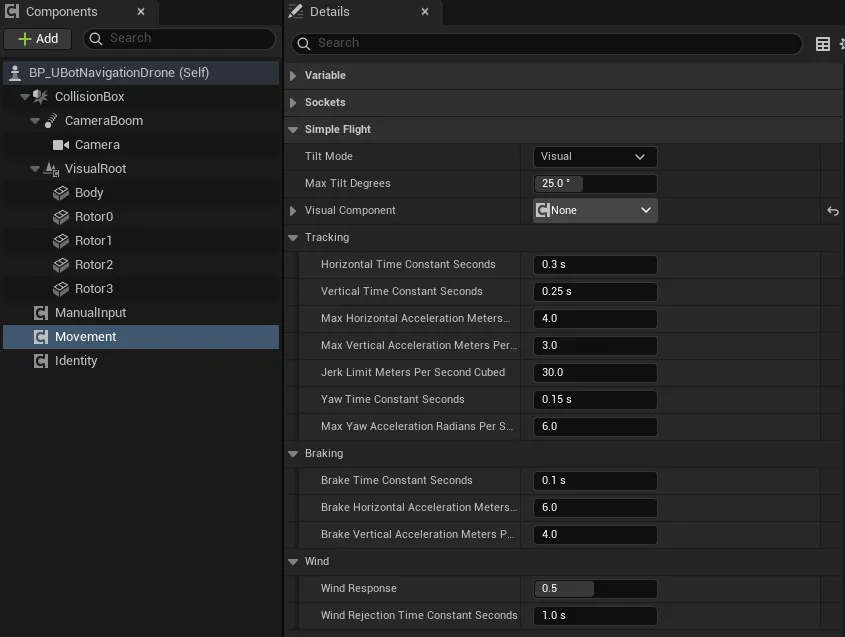
在蓝图编辑器里,Visual Component 显示为 None。这是 UE 的组件选择器对蓝图里添加的组件的显示限制:示例实际指向 VisualRoot,运行时生效,不用去改它。
Velocity Limits(在共有属性里)默认水平 10 m/s、爬升 3 m/s、下降 2 m/s、偏航 π/2 rad/s。其余属性见 uBot Simple Flight 和 uBot Multirotor Movement。
Get Multirotor State 返回无人机的真值状态,用 Break UBot Multirotor State 取出位置(m)、姿态、线速度(m/s)、角速度(rad/s)等:
连线:
- Event Tick 的 执行,连到 Print String 的 执行
- Find Multirotor Movement 的 Return Value,连到 Get Multirotor State 的 Target
- Get Multirotor State 的 Return Value,连到 Break UBot Multirotor State 的 UBot Multirotor State
- Break UBot Multirotor State 的 Linear Velocity Meters Per Second,连到 Vector Length 的 A
- Vector Length 的 Return Value,连到 To String (Float) 的 In Double
- To String (Float) 的 Return Value,连到 Print String 的 In String
Event Tick
UE 引擎 · 中文界面:事件Tick
Event called every frame, if ticking is enabled
输出
- 执行
- Delta Seconds
Float
查看参考AActor.ReceiveTick
Find Multirotor Movement
uBot Multirotor Library · UBotAerial
返回 Actor 上的多旋翼运动组件(第一个),没有则为空。
输入
- Actor
Actor对象引用
输出
- Return Value
uBot Multirotor Movement对象引用
查看参考UUBotMultirotorLibrary.FindMultirotorMovement
Get Multirotor State
Target is uBot Multirotor Movement · UBotAerial
最近一个物理步的真值状态(SI 单位,UE 世界轴)。
输入
- Target
uBot Multirotor Movement对象引用
输出
- Return Value
UBot Multirotor State结构体
查看参考UUBotMultirotorMovementComponent.GetMultirotorState
Break UBot Multirotor State
UBotAerial
把 UBot Multirotor State 拆成位置、姿态、线速度、角速度、线加速度、比力、旋翼转速和仿真时间。
输入
- UBot Multirotor State
UBot Multirotor State结构体
输出
- Position Meters
Vector - Orientation
Quat结构体 - Linear Velocity Meters Per Second
Vector - Angular Velocity Radians Per Second
Vector - Linear Acceleration Meters Per Second Squared
Vector - Specific Force Meters Per Second Squared
Vector - Rotor Speeds Radians Per Second
Float (double)数组 - Sim Time Seconds
Float (double)
查看参考Break:FUBotMultirotorState
Vector Length
UE 引擎 · 中文界面:向量长度
Returns the length of the vector
输入
- A
Vector
输出
- Return Value
Float (double)
查看参考UKismetMathLibrary.VSize
To String (Float)
UE 引擎 · 中文界面:转换为字符串(浮点)
Converts a double value to a string
输入
- In Double
Float (double)
输出
- Return Value
String
查看参考UKismetStringLibrary.Conv_DoubleToString
Print String
UE 引擎 · 中文界面:打印字符串
Prints a string to the log, and optionally, to the screen If Print To Log is true, it will be visible in the Output Log window. Otherwise it will be logged only as 'Verbose', so it generally won't show up.
输入
- 执行
- In String
String - Print to Screen
Boolean - Print to Log
Boolean - Text Color
Linear Color结构体 - Duration
Float - Key
Name
输出
- 执行
查看参考UKismetSystemLibrary.PrintString
- 倾斜不是动力学的结果:机体 Z 轴指向加速度减去重力的方向,倾角不超过
Max Tilt Degrees。Tilt Mode决定哪一部分跟着倾斜:None:都不倾斜,只偏航。Visual(默认):只有Visual Component指向的外观倾斜,挂在根组件上的传感器保持水平。Body:根组件倾斜,传感器看到真实多旋翼会有的姿态。
Get Tilted Attitude在任何模式下都返回倾斜后的姿态。- 物理步频默认 500 Hz,
Physics Rate Hz可以调,范围 100 到 4000 Hz。它按 uBot 仿真时钟推进,暂停时不动;恒定指令下,不同帧率的结果相同,新指令从下一帧开始生效。 - 导航无人机没有姿态、角速度和电机指令的接口,需要它们时用 物理无人机。
- uBot Simple Flight:全部节点和属性。
- uBot Multirotor Library:
Find Multirotor Movement。 - 物理无人机的指令与控制模式:需要姿态、角速度或电机指令时。