

相机采集协调器
需要:uBotSensor 0.1.x(含依赖 uBotCore)
用相机采集协调器(Camera Capture Coordinator)让 RGB 和深度等多个相机在同一仿真时刻采集,并用组序号把它们的帧配成一对。
连线:
- Event BeginPlay 的 执行,连到 Start Capture Group 的 执行
- Coordinator 的 Coordinator,连到 Start Capture Group 的 Target
- Start Capture Group 的 执行,连到 Capture Group Once 的 执行
- Coordinator 的 Coordinator,连到 Capture Group Once 的 Target
- Capture Group Once 的 执行,连到 Branch 的 执行
- Capture Group Once 的 Return Value,连到 Branch 的 Condition
- Branch 的 False,连到 Print String 的 执行
Auto Start默认开启时协调器已经在运行,这里的Start Capture Group直接返回 true。- 自动采集的第一组要等一个间隔之后,需要立刻拿到一组帧时手动采集。
Event BeginPlay
UE 引擎 · 中文界面:事件开始运行
Event when play begins for this actor.
输出
- 执行
查看参考AActor.ReceiveBeginPlay
Coordinator
组件或变量引用。在 Components 面板里把 Coordinator 拖进事件图即可得到它。
输出
- Coordinator
uBot Camera Capture Coordinator对象引用
Start Capture Group
Target is uBot Camera Capture Coordinator · UBotSensor
启动自动采集,第一次采集在一个间隔之后。Enabled 为 false 或协调器没有注册成功时返回 false。
输入
- 执行
- Target
uBot Camera Capture Coordinator对象引用
输出
- 执行
- Return Value
Boolean
查看参考UUBotCameraCaptureCoordinatorComponent.StartCaptureGroup
Capture Group Once
Target is uBot Camera Capture Coordinator · UBotSensor
立即采集一组,不要求采集组在运行。组里所有相机都成功时返回 true。
输入
- 执行
- Target
uBot Camera Capture Coordinator对象引用
输出
- 执行
- Return Value
Boolean
查看参考UUBotCameraCaptureCoordinatorComponent.CaptureGroupOnce
Branch
UE 引擎 · 中文界面:分支
Branch Statement If Condition is true, execution goes to True, otherwise it goes to False
输入
- 执行
- Condition
Boolean
输出
- True
- False
查看参考K2Node_IfThenElse
Print String
UE 引擎 · 中文界面:打印字符串
Prints a string to the log, and optionally, to the screen If Print To Log is true, it will be visible in the Output Log window. Otherwise it will be logged only as 'Verbose', so it generally won't show up.
输入
- 执行
- In String
String - Print to Screen
Boolean - Print to Log
Boolean - Text Color
Linear Color结构体 - Duration
Float - Key
Name
输出
- 执行
查看参考UKismetSystemLibrary.PrintString
连线:
- On Image Frame Ready (Rgb) 的 执行,连到 Print String 的 执行
- On Image Frame Ready (Rgb) 的 Frame,连到 Get Capture Sequence 的 Target
- Get Capture Sequence 的 Capture Sequence,连到 To String (Integer64) 的 In Int
- To String (Integer64) 的 Return Value,连到 Print String 的 In String
- 深度相机的
On Image Frame Ready也这样接,两条日志上的数字相同。
On Image Frame Ready (Rgb)
UBot Camera Sensor Component · UBotSensor
每次产生有效帧后触发,Frame 是这一帧。
输出
- 执行
- Frame
UBot Image Frame对象引用
查看参考UUBotCameraSensorComponent.OnImageFrameReady
Get Capture Sequence
这个节点没有登记在 API 数据里(inline 节点),引脚未经校验。
输入
- Target
UBot Image Frame对象引用
输出
- Capture Sequence
Integer64
inline 节点:未在 data/api 中登记
To String (Integer64)
UE 引擎 · 中文界面:转换为字符串(Integer64)
Converts an 64-bit integer value to a string
输入
- In Int
Integer64
输出
- Return Value
String
查看参考UKismetStringLibrary.Conv_Int64ToString
Print String
UE 引擎 · 中文界面:打印字符串
Prints a string to the log, and optionally, to the screen If Print To Log is true, it will be visible in the Output Log window. Otherwise it will be logged only as 'Verbose', so it generally won't show up.
输入
- 执行
- In String
String - Print to Screen
Boolean - Print to Log
Boolean - Text Color
Linear Color结构体 - Duration
Float - Key
Name
输出
- 执行
查看参考UKismetSystemLibrary.PrintString
-
给相机设置采集组
选中每个要同步的相机组件,在「Details」面板的「Camera > Synchronization」里把
Capture Group Id填成同一个名字,这些相机就属于同一个采集组(capture group)。填了组 ID 的相机不再自己采样。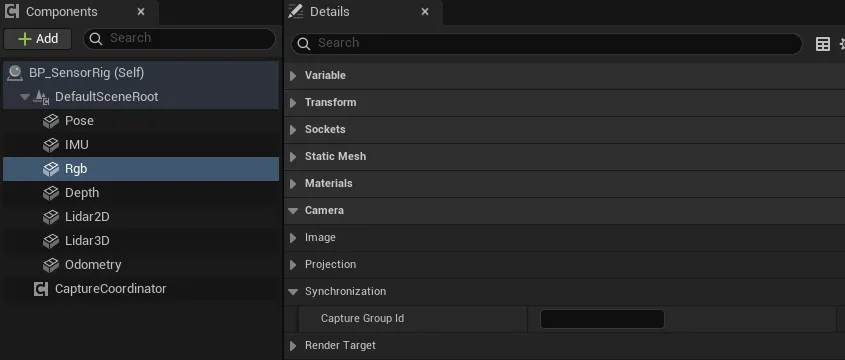
-
添加协调器
在「Components」面板点「Add」,搜索
uBot Camera Capture Coordinator,在「Camera Capture Group」里填同一个Capture Group Id。一个组 ID 只能有一个协调器。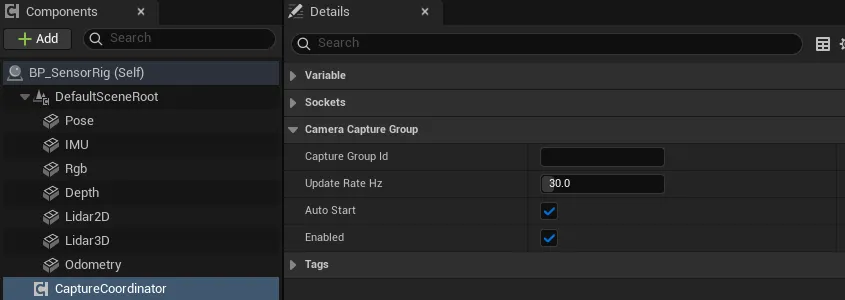
-
设置频率
协调器的
Update Rate Hz(默认 30 Hz)决定整组的采集频率。相机自己的Update Rate Hz在组里不起作用。 -
连蓝图
绑定各相机的
On Image Frame Ready,照第二张图读出Capture Sequence。需要像素时在回调里读回,见 RGB 相机。 -
运行
Auto Start默认开启,协调器在 BeginPlay 时自动启动。
| 属性 | 默认值 | 作用 |
|---|---|---|
Capture Group Id |
空 | 组 ID,协调器上必须非空,并与相机上的一致 |
Update Rate Hz |
30 | 整组的采集频率,单位 Hz,范围 0.1 到 240 |
Auto Start |
true | BeginPlay 时自动启动采集组 |
Enabled |
true | 总开关。为 false 时 Start Capture Group 和 Capture Group Once 都返回 false |
相机组件上与协调器配合的只有 Capture Group Id。
| 节点 | 作用 |
|---|---|
Start Capture Group |
启动自动采集,已在运行时直接返回 true。Enabled 为 false 或协调器没有注册成功时返回 false |
Stop Capture Group |
停止自动采集,手动采集仍然可用 |
Capture Group Once |
立即采集一组,不要求采集组在运行。组里所有相机都成功时返回 true |
Is Capture Group Running |
自动采集是否在运行 |
Get Registered Camera Count |
登记在这个组 ID 下的相机数 |
Get Dropped Capture Count |
因为一帧跨过多个采集间隔而跳过的采集次数 |
On Capture Group Error |
事件,Error Message 是出错原因 |
采集后,每台相机的 On Image Frame Ready 照常触发。帧(UBot Image Frame)上多出这些字段:
| 字段 | 内容 |
|---|---|
Capture Group Id |
所属的组 ID |
Capture Sequence |
组序号,从 1 开始,每采集一组加 1。同一次组采集里所有相机相同 |
Capture Timestamp Seconds |
组时间戳,单位 s,是采集时的仿真时间 |
Synchronized |
在采集组里采集的帧为 true |
帧头里的 Timestamp Seconds 同样使用组时间戳,而帧头的 Sequence 仍是每台相机自己的计数。
On Capture Group Error 的 Error Message 有这几种:
| 情况 | 消息 |
|---|---|
| 协调器的组 ID 为空 | Camera capture coordinator requires a non-empty Capture Group Id. |
| 同一个组 ID 已有协调器 | Camera capture group '<Id>' already has a coordinator. |
| 组里没有登记的相机 | Camera capture group '<Id>' has no registered cameras. |
| 有相机采集失败 | One or more cameras failed in capture group '<Id>'. |
相机一侧也有一种错误:组里没有协调器时,相机在下一个 tick 通过 On Sensor Error 报告 Camera capture group '<Id>' has no coordinator; automatic capture is disabled.。
- 自动采集的第一组在启动之后一个间隔(1 /
Update Rate Hz)才发生,不会立即采集。 - 每个 world tick 最多采集一组。一帧跨过多个间隔时,多出来的间隔不补采,而是计入
Get Dropped Capture Count,Start Capture Group时清零。 - 同组相机按组件路径名排序,依次采集,共用同一个组序号和时间戳。它们的
On Image Frame Ready因此一个接一个触发,配对时比较Capture Sequence。 - 每台相机的帧在下一次组采集后过期,要读回像素就在那之前完成。
- 填了组 ID 的相机不会自己启动:
Start Sensor返回 false,Auto Start不起作用。 - 游戏暂停时协调器不会 tick,自动采集随之暂停。时间和调度的规则见仿真时钟与采样调度。
- uBot Camera Capture Coordinator:全部节点和属性。
- UBot Camera Sensor Component:相机上的
Capture Group Id。 - UBot Image Frame:帧上的同步字段。
- RGB 相机和深度相机:读回像素和深度。
- 传感器通用用法:启动、停止和通用事件。