

位姿传感器
需要:uBotSensor 0.1.x(含依赖 uBotCore)
用位姿传感器(uBot Pose Sensor)读取组件的位置、姿态和速度,并选择参考系。
位姿传感器每采样一次就触发 On Pose Data Updated。下面的图在有速度时打印线速度的大小,单位是 m/s:
连线:
- On Pose Data Updated (Pose) 的 Data,连到 Break UBot Pose Sensor Data 的 UBot Pose Sensor Data
- On Pose Data Updated (Pose) 的 执行,连到 Branch 的 执行
- Break UBot Pose Sensor Data 的 Has Velocity,连到 Branch 的 Condition
- Break UBot Pose Sensor Data 的 Linear Velocity Meters Per Second,连到 Vector Length 的 A
- Vector Length 的 Return Value,连到 To String (Float) 的 In Double
- To String (Float) 的 Return Value,连到 Print String 的 In String
- Branch 的 True,连到 Print String 的 执行
- 选中节点,在「Details」面板里取消勾选不用的字段,引脚就会隐藏。
- 没有速度时
Has Velocity为 false,速度字段是 0。
On Pose Data Updated (Pose)
uBot Pose Sensor · UBotSensor
每次位姿采样后触发,包括参考系无效的 Error 样本。Data 是本次的完整数据。
输出
- 执行
- Data
UBot Pose Sensor Data结构体
查看参考UUBotPoseSensorComponent.OnPoseDataUpdated
Break UBot Pose Sensor Data
UBotSensor
把 UBot Pose Sensor Data 拆成帧头、参考系名、位置、姿态、速度和 Has Velocity。
输入
- UBot Pose Sensor Data
UBot Pose Sensor Data结构体
输出
- Header
UBot Frame Header结构体 - Reference Frame Id
String - Position Meters
Vector - Orientation Quaternion
Quat结构体 - Linear Velocity Meters Per Second
Vector - Angular Velocity Rad Per Second
Vector - Has Velocity
Boolean
查看参考Break:FUBotPoseSensorData
Branch
UE 引擎 · 中文界面:分支
Branch Statement If Condition is true, execution goes to True, otherwise it goes to False
输入
- 执行
- Condition
Boolean
输出
- True
- False
查看参考K2Node_IfThenElse
Vector Length
UE 引擎 · 中文界面:向量长度
Returns the length of the vector
输入
- A
Vector
输出
- Return Value
Float (double)
查看参考UKismetMathLibrary.VSize
To String (Float)
UE 引擎 · 中文界面:转换为字符串(浮点)
Converts a double value to a string
输入
- In Double
Float (double)
输出
- Return Value
String
查看参考UKismetStringLibrary.Conv_DoubleToString
Print String
UE 引擎 · 中文界面:打印字符串
Prints a string to the log, and optionally, to the screen If Print To Log is true, it will be visible in the Output Log window. Otherwise it will be logged only as 'Verbose', so it generally won't show up.
输入
- 执行
- In String
String - Print to Screen
Boolean - Print to Log
Boolean - Text Color
Linear Color结构体 - Duration
Float - Key
Name
输出
- 执行
查看参考UKismetSystemLibrary.PrintString
不想用事件时,在 Event Tick 里调用 Get Latest Pose Data 读最近一次的数据,后面的连法相同。
-
添加组件
在「Components」面板点「Add」,搜索
uBot Pose Sensor,把它挂到要测量的部件下。输出的就是这个组件自己的位姿。 -
选择参考系
在「Details」面板的「Pose Sensor」类别里设置
Reference Frame。选Custom Component时,再在Custom Reference Component里选一个组件。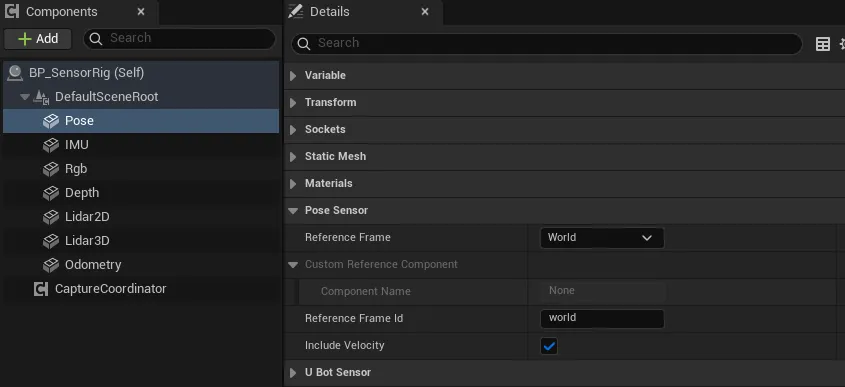
-
设置参考系名
Reference Frame Id默认是world。参考系不是World时,把它改成真实的 frame 名,或者清空让传感器自动取组件名。 -
连蓝图
选中组件,在「Details」面板底部「Events」区点
On Pose Data Updated旁的「+」,照上图连线。
| 属性 | 默认值 | 作用 |
|---|---|---|
Reference Frame |
World |
位姿相对谁来表示,见下表 |
Custom Reference Component |
空 | Reference Frame 为 Custom Component 时使用的组件 |
Reference Frame Id |
world |
写入输出的参考系名;为空时按参考系自动取名 |
Include Velocity |
true | 是否用相邻样本差分计算速度 |
Update Rate Hz |
30 | 采样频率,单位 Hz |
Sensor Id、Frame Id |
pose_sensor |
写入帧头的标识 |
三种参考系:
Reference Frame |
位姿相对于 | Reference Frame Id 为空时用 |
无效时 |
|---|---|---|---|
World |
世界坐标系 | world |
不会无效 |
Parent |
组件所附着的父组件 | 父组件的名字 | 没有父组件,样本为 Error |
Custom Component |
Custom Reference Component |
该组件的名字 | 组件无效,样本为 Error |
通用属性(Auto Start、Sensor Enabled 等)见传感器通用用法。
Get Latest Pose Data 返回 UBot Pose Sensor Data,用 Break UBot Pose Sensor Data 拆开:
| 字段 | 单位 | 说明 |
|---|---|---|
Header |
帧头,见帧头与采样状态 | |
Reference Frame Id |
这一次实际使用的参考系名 | |
Position Meters |
m | 在参考系里的位置,轴向是 UE 的 X 前、Y 右、Z 上 |
Orientation Quaternion |
在参考系里的姿态,已归一化 | |
Linear Velocity Meters Per Second |
m/s | 位置差分得到的线速度,轴向与位置相同 |
Angular Velocity Rad Per Second |
rad/s | 姿态差分得到的角速度,轴向与位置相同 |
Has Velocity |
速度是否有值 |
On Pose Data Updated:每次采样都触发,引脚Data。参考系无效时也会触发,此时Header的Status是Error,其余字段为默认值。Get Latest Pose Data:返回最近一次的数据,不会触发采样。Sample Pose:立即采样一次,样本为Valid时返回 true。
位姿传感器的状态码:
Status |
什么时候 |
|---|---|
Valid |
参考系解析成功,包括启动后的第一个样本 |
Error |
Parent 没有父组件,或 Custom Component 无效;同时触发 On Sensor Error |
Disabled |
Sensor Enabled 为 false,只触发 On Sensor Sampled |
- 速度由相邻两个样本差分得到,所以启动后的第一个样本没有速度。
Include Velocity关闭,或两个样本的仿真时间相同,也没有速度。 - 速度的轴向是参考系的轴向,不是传感器的本地轴向。IMU 和里程计的速度才是本地轴向。
- 位姿传感器不做瞬移检测:Actor 被瞬间移走时,下一个样本的速度会很大。
Noise Enabled对位姿传感器无效,输出始终是真值。- 参考组件的缩放不是 1 时,相对位置也会被缩放。尽量选没有缩放的组件作参考。
- 数据保持 UE 的轴向,位置从厘米换算成米。需要 ROS 约定时,用
UE To ROS Vector、UE To ROS Rotation和UE To ROS Angular Velocity,见坐标系与单位。 - 所有属性在蓝图里只读,要在「Details」面板里设置。
- uBot Pose Sensor:全部节点和属性。
- UBot Pose Sensor Data:每个字段的含义。
- EUBot Pose Reference Frame:参考系枚举。
- UBot Conventions Library:UE 与 ROS 之间的换算节点。
- 传感器通用用法:启动、停止、手动采样和通用事件。