

从 ROS 2 发飞行指令
需要:uBotROS 0.1.2 及以上 0.1.x(含依赖 uBotCore、uBotSensor)
用 uBot ROS Attitude Command 和 uBot ROS Motor Command 接收 ROS 2 的姿态、角速度和电机指令,交给 UE 里的无人机,用来研究飞控。
两个组件和 接收 cmd_vel 的速度指令组件用法相同:每收到一条有效指令就触发事件,没有现成的执行器时也可以直接在蓝图里处理:
连线:
- On Attitude Command (AttitudeCmd) 的 执行,连到 Print String 的 执行
- On Attitude Command (AttitudeCmd) 的 Command,连到 Break UBot Attitude Command 的 UBot Attitude Command
- Break UBot Attitude Command 的 Normalized Thrust,连到 To String (Float) 的 In Double
- To String (Float) 的 Return Value,连到 Print String 的 In String
- 指令已经换算成 UE 的轴向。
Use Thrust为 false 时,推力无意义,由无人机自己保持高度。
On Attitude Command (AttitudeCmd)
uBot ROS Attitude Command · UBotROS
每条有效姿态指令换算之后触发,有没有目标都触发。
输出
- 执行
- Command
UBot Attitude Command结构体
查看参考UUBotROSAttitudeCommandComponent.OnAttitudeCommand
Break UBot Attitude Command
UBotCore
把 UBot Attitude Command 拆成姿态、推力、偏航角速度、时间戳和来源等字段。
输入
- UBot Attitude Command
UBot Attitude Command结构体
输出
- Orientation
Quat结构体 - Use Yaw Rate
Boolean - Yaw Rate Radians Per Second
Float (double) - Use Thrust
Boolean - Normalized Thrust
Float (double) - Vertical Velocity Meters Per Second
Float (double) - Timestamp Seconds
Float (double) - Source
Name
查看参考Break:FUBotAttitudeCommand
To String (Float)
UE 引擎 · 中文界面:转换为字符串(浮点)
Converts a double value to a string
输入
- In Double
Float (double)
输出
- Return Value
String
查看参考UKismetStringLibrary.Conv_DoubleToString
Print String
UE 引擎 · 中文界面:打印字符串
Prints a string to the log, and optionally, to the screen If Print To Log is true, it will be visible in the Output Log window. Otherwise it will be logged only as 'Verbose', so it generally won't show up.
输入
- 执行
- In String
String - Print to Screen
Boolean - Print to Log
Boolean - Text Color
Linear Color结构体 - Duration
Float - Key
Name
输出
- 执行
查看参考UKismetSystemLibrary.PrintString
-
装 ROS 2 端的消息包
桥在订阅时才加载消息类型,所以只用其中一个组件时,只需要装对应的消息包:
ros-humble-mavros-msgs(姿态和角速度)或ros-humble-actuator-msgs(单电机)。两个都用:sudo apt install ros-humble-mavros-msgs ros-humble-actuator-msgs。 -
添加组件
在无人机的蓝图上点「Components」面板的「Add」,搜索
uBot ROS Attitude Command(姿态和角速度)或uBot ROS Motor Command(单电机),可以两个都加。属性在「Details」面板的「U Bot > ROS > Command」下: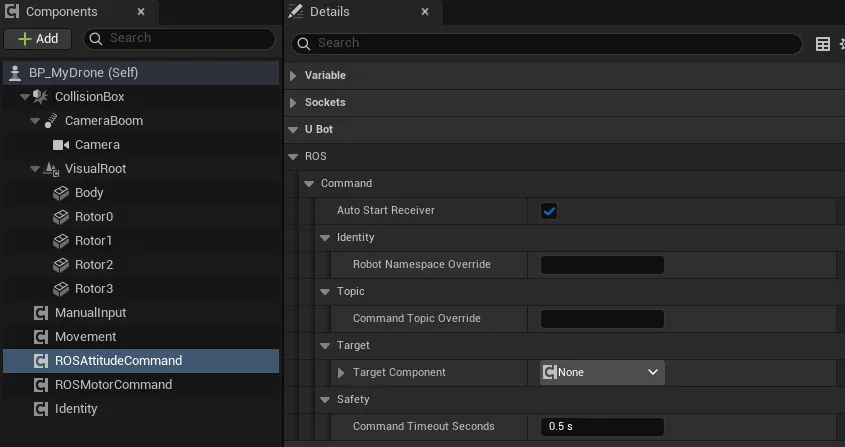
-
确定话题
默认话题是
/<namespace>/cmd_attitude(mavros_msgs/msg/AttitudeTarget)和/<namespace>/cmd_motors(actuator_msgs/msg/Actuators)。命名空间取自uBot Identity,规则与 接收 cmd_vel 相同。 -
确定谁来执行指令
目标是实现了 uBotCore 姿态或电机指令接口的对象,例如 uBotAerial 的
uBot Multirotor Dynamics,见 物理无人机的指令与控制模式。Target Component为空时自动查找。 -
从 ROS 2 发指令
终端窗口 # 姿态:ROS 世界系下的绝对姿态,机头指向 +y(向左),推力 60%ros2 topic pub -r 50 /drone/cmd_attitude mavros_msgs/msg/AttitudeTarget "{orientation: {z: 0.7071068, w: 0.7071068}, thrust: 0.6}"# 角速度:绕 z 轴 1 rad/s(向左偏航),不给推力(保持高度)ros2 topic pub -r 50 /drone/cmd_attitude mavros_msgs/msg/AttitudeTarget "{type_mask: 192, body_rate: {z: 1.0}}"# 四个电机的转速(rad/s)ros2 topic pub -r 100 /drone/cmd_motors actuator_msgs/msg/Actuators "{velocity: [800.0, 800.0, 800.0, 800.0]}"命令里的
drone换成你的命名空间。
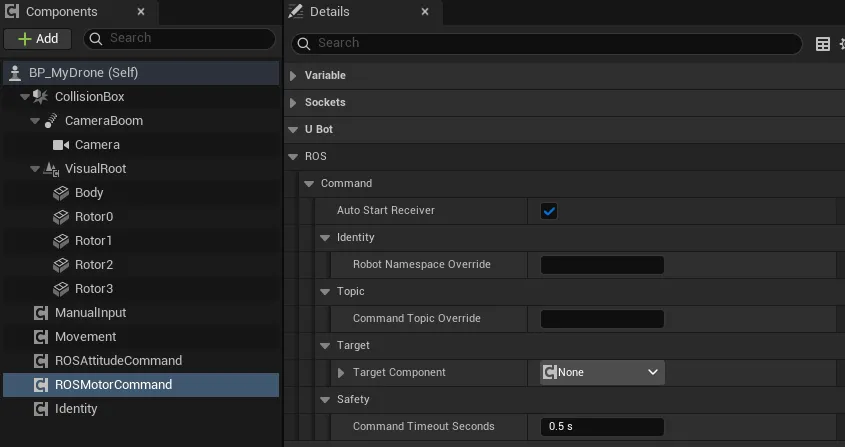
两个组件共有的 5 个属性(来自 uBot ROS Command Receiver)与速度指令组件相同。速度指令组件另有 Max Linear Speed Meters Per Second 和 Max Angular Speed Radians Per Second 两个限速,这两个组件没有:
| 属性 | 默认值 | 作用 |
|---|---|---|
Auto Start Receiver |
true | Begin Play 时订阅 |
Robot Namespace Override |
空 | 空则用 uBot Identity 的命名空间 |
Command Topic Override |
空 | 非空时替代默认话题 |
Target Component |
空 | 接收指令的组件;空则自动查找 |
Command Timeout Seconds |
0.5 s | 超过这么久(仿真时间)没有新指令,就释放指令;0 关闭超时 |
消息如何转换
Section titled “消息如何转换”AttitudeTarget 由 type_mask 决定是姿态指令还是角速度指令:
type_mask |
结果 |
|---|---|
不含 IGNORE_ATTITUDE(128) |
姿态指令:orientation(ROS 世界系)换算成 UE 的姿态;body_rate 不使用 |
含 IGNORE_ATTITUDE |
角速度指令:body_rate(FLU)换算成 UE 的角速度;带 IGNORE_ROLL_RATE(1)、IGNORE_PITCH_RATE(2)、IGNORE_YAW_RATE(4)的轴为 0 |
不含 IGNORE_THRUST(64) |
thrust(飞行器最大总推力的比例)截到 0 到 1 后使用 |
含 IGNORE_THRUST |
不给推力,无人机自己保持高度 |
Actuators 的换算:velocity[] 有值时按电机转速(rad/s,负值按 0),否则用 normalized[](截到 0 到 1);position[] 不使用。值的个数与目标的电机数(Get Motor Count)不同时不下发,触发 On Command Error。
ROS 世界系和机体系(FLU)到 UE 轴向的换算见 坐标与单位。
| 节点 | 作用 |
|---|---|
On Attitude Command / On Body Rate Command |
每条有效的姿态或角速度指令换算后触发,Command 是结果 |
On Motor Command |
每条有效的电机指令换算后触发 |
On Command Timeout |
每次超时触发一次,在目标收到释放之后 |
On Command Error |
订阅失败、消息畸形、个数不符或目标不可用;Error Message 是原因 |
Get Last Attitude Command / Get Last Body Rate Command / Get Last Motor Command |
最近一条有效指令 |
Set Target Component |
用一个组件直接替换 Target Component;传空则恢复自动查找 |
超过 Command Timeout Seconds 没有新指令时,目标收到一次 Release Attitude Command 或 Release Motor Command,由无人机自己兜底。uBotAerial 的物理无人机默认刹车悬停,见 物理无人机的指令与控制模式。End Play 时指令仍然有效也会释放。
连线:
- On Command Timeout (AttitudeCmd) 的 执行,连到 Print String 的 执行
- On Command Error (AttitudeCmd) 的 执行,连到 Print String 的 执行
- On Command Error (AttitudeCmd) 的 Error Message,连到 Print String 的 In String
On Command Timeout (AttitudeCmd)
uBot ROS Command Receiver · UBotROS
每次超时触发一次,在目标(如果有)被释放之后。
输出
- 执行
查看参考UUBotROSCommandReceiverComponent.OnCommandTimeout
Print String
UE 引擎 · 中文界面:打印字符串
Prints a string to the log, and optionally, to the screen If Print To Log is true, it will be visible in the Output Log window. Otherwise it will be logged only as 'Verbose', so it generally won't show up.
输入
- 执行
- In String
String - Print to Screen
Boolean - Print to Log
Boolean - Text Color
Linear Color结构体 - Duration
Float - Key
Name
输出
- 执行
查看参考UKismetSystemLibrary.PrintString
On Command Error (AttitudeCmd)
uBot ROS Command Receiver · UBotROS
订阅失败、消息畸形或无效、目标不可用或拒绝了指令时触发。
输出
- 执行
- Error Message
String
查看参考UUBotROSCommandReceiverComponent.OnCommandError
Print String
UE 引擎 · 中文界面:打印字符串
Prints a string to the log, and optionally, to the screen If Print To Log is true, it will be visible in the Output Log window. Otherwise it will be logged only as 'Verbose', so it generally won't show up.
输入
- 执行
- In String
String - Print to Screen
Boolean - Print to Log
Boolean - Text Color
Linear Color结构体 - Duration
Float - Key
Name
输出
- 执行
查看参考UKismetSystemLibrary.PrintString
- 订阅的 QoS 是 best_effort / volatile / 深度 10,
ros2 topic pub默认的 reliable 发布者可以直接用。 - ROS 2 端要持续发布:发布间隔超过
Command Timeout Seconds,指令就被释放。上面的例子用-r 50和-r 100。 - 这两个组件不含控制逻辑,只换算消息。飞控在无人机一侧(内置或 自己写)。
- uBot ROS Attitude Command 和 uBot ROS Motor Command:全部节点和属性。
- uBot ROS Command Receiver:三个指令组件共有的超时、错误事件和目标设置。
- 接收 cmd_vel:速度指令。