

IMU 传感器
需要:uBotSensor 0.1.x(含依赖 uBotCore)
用 IMU 传感器(uBot IMU Sensor)读取姿态、角速度和比力,并了解噪声、偏置、滤波和状态码的作用。
需要一个装了 uBot IMU Sensor 组件的 Actor,做法见五分钟上手。
每次采样时读取姿态角
Section titled “每次采样时读取姿态角”IMU 每采样一次就触发 On Imu Data Updated,在这个事件里把姿态四元数换算成横滚(Roll)、俯仰(Pitch)和偏航(Yaw):
连线:
- On Imu Data Updated (IMU) 的 Data,连到 Break UBot Imu Sensor Data 的 UBot Imu Sensor Data
- Break UBot Imu Sensor Data 的 Orientation Quaternion,连到 ToRotator (Quat) 的 Q
- ToRotator (Quat) 的 Return Value,连到 Break Rotator 的 Rotation
- 选中节点,在「Details」面板里取消勾选不用的字段,引脚就会隐藏。
- 从
Orientation Quaternion拖出,搜索ToRotator (Quat)。
On Imu Data Updated (IMU)
uBot IMU Sensor · UBotSensor
每次 IMU 采样后触发,包括无效样本。Data 是本次的完整数据。
输出
- 执行
- Data
UBot Imu Sensor Data结构体
查看参考UUBotImuSensorComponent.OnImuDataUpdated
Break UBot Imu Sensor Data
UBotSensor
把 UBot Imu Sensor Data 拆成帧头、姿态、角速度、比力和三组方差。
输入
- UBot Imu Sensor Data
UBot Imu Sensor Data结构体
输出
- Header
UBot Frame Header结构体 - Orientation Quaternion
Quat结构体 - Angular Velocity Rad Per Second
Vector - Linear Acceleration Meters Per Second Squared
Vector - Orientation Variance
Vector - Angular Velocity Variance
Vector - Linear Acceleration Variance
Vector
查看参考Break:FUBotImuSensorData
ToRotator (Quat)
UE 引擎 · 中文界面:到旋转体(四元数)
Converts to Rotator representation of this Quaternion.
输入
- Q
Quat结构体
输出
- Return Value
Rotator
查看参考UKismetMathLibrary.Quat_Rotator
Break Rotator
UE 引擎 · 中文界面:拆分旋转体
Breaks apart a rotator into {Roll, Pitch, Yaw} angles in degrees
输入
- Rotation
Rotator
输出
- X (Roll)
Float - Y (Pitch)
Float - Z (Yaw)
Float
查看参考UKismetMathLibrary.BreakRotator
用到角度的逻辑接在事件的执行引脚后面。Break Rotator 输出 X (Roll)、Y (Pitch) 和 Z (Yaw),单位都是度:Roll 和 Yaw 在 -180 到 180 之间,Pitch 在 -90 到 90 之间。
这是组件在 UE 世界坐标系下的姿态。需要 ROS 约定的四元数时,用 UE To ROS Rotation 换算。
在自己的时机读取
Section titled “在自己的时机读取”不想用事件时,在 Event Tick 或计时器里调用 Get Latest IMUData,拿到最近一次样本。读到的字段怎么用与事件里相同,下面以比力为例:
连线:
- Event Tick 的 执行,连到 Print String 的 执行
- IMU 的 IMU,连到 Get Latest IMUData 的 Target
- Get Latest IMUData 的 Return Value,连到 Break UBot Imu Sensor Data 的 UBot Imu Sensor Data
- Break UBot Imu Sensor Data 的 Linear Acceleration Meters Per Second Squared,连到 To String (Vector) 的 In Vec
- To String (Vector) 的 Return Value,连到 Print String 的 In String
- 从「Components」面板把 IMU 组件拖进事件图。
Event Tick
UE 引擎 · 中文界面:事件Tick
Event called every frame, if ticking is enabled
输出
- 执行
- Delta Seconds
Float
查看参考AActor.ReceiveTick
IMU
组件或变量引用。在 Components 面板里把 IMU 拖进事件图即可得到它。
输出
- IMU
uBot IMU Sensor对象引用
Get Latest IMUData
Target is uBot IMU Sensor · UBotSensor
返回最近一次采样的 IMU 数据副本,不会触发新的采样。
输入
- Target
uBot IMU Sensor对象引用
输出
- Return Value
UBot Imu Sensor Data结构体
查看参考UUBotImuSensorComponent.GetLatestIMUData
Break UBot Imu Sensor Data
UBotSensor
把 UBot Imu Sensor Data 拆成帧头、姿态、角速度、比力和三组方差。
输入
- UBot Imu Sensor Data
UBot Imu Sensor Data结构体
输出
- Header
UBot Frame Header结构体 - Orientation Quaternion
Quat结构体 - Angular Velocity Rad Per Second
Vector - Linear Acceleration Meters Per Second Squared
Vector - Orientation Variance
Vector - Angular Velocity Variance
Vector - Linear Acceleration Variance
Vector
查看参考Break:FUBotImuSensorData
To String (Vector)
UE 引擎 · 中文界面:到字符串(向量)
Converts a vector value to a string, in the form 'X= Y= Z='
输入
- In Vec
Vector
输出
- Return Value
String
查看参考UKismetStringLibrary.Conv_VectorToString
Print String
UE 引擎 · 中文界面:打印字符串
Prints a string to the log, and optionally, to the screen If Print To Log is true, it will be visible in the Output Log window. Otherwise it will be logged only as 'Verbose', so it generally won't show up.
输入
- 执行
- In String
String - Print to Screen
Boolean - Print to Log
Boolean - Text Color
Linear Color结构体 - Duration
Float - Key
Name
输出
- 执行
查看参考UKismetSystemLibrary.PrintString
Get Latest IMUData只读缓存,不会触发采样,开销很小。- 每帧都读时可能连续读到同一个样本,比较帧头的
Sequence可以判断是不是新数据。
读取角速度和比力
Section titled “读取角速度和比力”角速度和比力只在 Valid 样本里有值,所以先检查帧头的 Valid:
连线:
- On Imu Data Updated (IMU) 的 Data,连到 Break UBot Imu Sensor Data 的 UBot Imu Sensor Data
- Break UBot Imu Sensor Data 的 Header,连到 Break UBot Frame Header 的 UBot Frame Header
- On Imu Data Updated (IMU) 的 执行,连到 Branch 的 执行
- Break UBot Frame Header 的 Valid,连到 Branch 的 Condition
- Break UBot Imu Sensor Data 的 Linear Acceleration Meters Per Second Squared,连到 To String (Vector) 的 In Vec
- To String (Vector) 的 Return Value,连到 Print String 的 In String
- Branch 的 True,连到 Print String 的 执行
On Imu Data Updated (IMU)
uBot IMU Sensor · UBotSensor
每次 IMU 采样后触发,包括无效样本。Data 是本次的完整数据。
输出
- 执行
- Data
UBot Imu Sensor Data结构体
查看参考UUBotImuSensorComponent.OnImuDataUpdated
Break UBot Imu Sensor Data
UBotSensor
把 UBot Imu Sensor Data 拆成帧头、姿态、角速度、比力和三组方差。
输入
- UBot Imu Sensor Data
UBot Imu Sensor Data结构体
输出
- Header
UBot Frame Header结构体 - Orientation Quaternion
Quat结构体 - Angular Velocity Rad Per Second
Vector - Linear Acceleration Meters Per Second Squared
Vector - Orientation Variance
Vector - Angular Velocity Variance
Vector - Linear Acceleration Variance
Vector
查看参考Break:FUBotImuSensorData
Break UBot Frame Header
UBotCore
把帧头拆成 Sensor Id、Frame Id、Sequence、Timestamp Seconds、Valid 和 Status。
输入
- UBot Frame Header
UBot Frame Header结构体
输出
- Sensor Id
String - Frame Id
String - Sequence
Integer64 - Timestamp Seconds
Float (double) - Valid
Boolean - Status
EUBot Sample Status枚举
查看参考Break:FUBotFrameHeader
Branch
UE 引擎 · 中文界面:分支
Branch Statement If Condition is true, execution goes to True, otherwise it goes to False
输入
- 执行
- Condition
Boolean
输出
- True
- False
查看参考K2Node_IfThenElse
To String (Vector)
UE 引擎 · 中文界面:到字符串(向量)
Converts a vector value to a string, in the form 'X= Y= Z='
输入
- In Vec
Vector
输出
- Return Value
String
查看参考UKismetStringLibrary.Conv_VectorToString
Print String
UE 引擎 · 中文界面:打印字符串
Prints a string to the log, and optionally, to the screen If Print To Log is true, it will be visible in the Output Log window. Otherwise it will be logged only as 'Verbose', so it generally won't show up.
输入
- 执行
- In String
String - Print to Screen
Boolean - Print to Log
Boolean - Text Color
Linear Color结构体 - Duration
Float - Key
Name
输出
- 执行
查看参考UKismetSystemLibrary.PrintString
角速度(Angular Velocity)单位是 rad/s,比力(Specific Force)单位是 m/s²,都在传感器的本地坐标系里(X 前、Y 右、Z 上)。比力是运动加速度减去重力,所以静止水平放置时读数约为 (0, 0, 9.8),自由下落时接近 0。
-
添加组件
在「Components」面板点「Add」,搜索
uBot IMU Sensor,重命名为IMU,挂到要测量的刚体上。 -
设置噪声(可选)
默认没有噪声。需要时先在「U Bot Sensor」类别的「Noise」子类别里勾选
Noise Enabled,再在「IMU」类别的「Noise」子类别里填写噪声和偏置。 -
设置滤波和限幅(可选)
在「IMU」类别的「Filter」子类别里勾选
Low Pass Filter Enabled,在「Safety」子类别里勾选Clamp Output。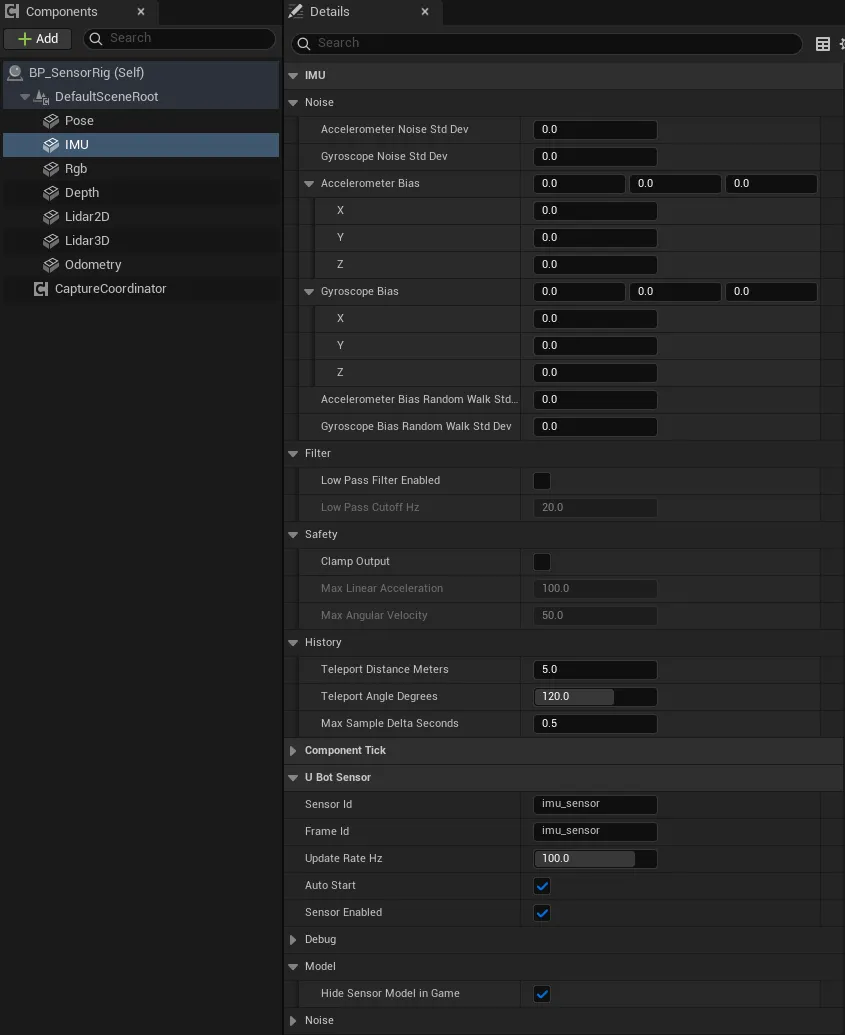
-
连蓝图
选中组件,在「Details」面板底部「Events」区点
On Imu Data Updated旁的「+」,照上图连线。
| 属性 | 默认值 | 作用 |
|---|---|---|
Update Rate Hz |
100 | 采样频率,单位 Hz |
Noise Enabled |
false | 噪声、偏置和偏置随机游走的总开关 |
Random Seed |
1337 | 每次 Start Sensor 用它重置随机序列 |
Accelerometer Noise Std Dev |
0 | 加速度计白噪声,单位 m/s² |
Gyroscope Noise Std Dev |
0 | 陀螺仪白噪声,单位 rad/s |
Accelerometer Bias |
(0, 0, 0) | 加速度计固定偏置,单位 m/s²,本地坐标系 |
Gyroscope Bias |
(0, 0, 0) | 陀螺仪固定偏置,单位 rad/s,本地坐标系 |
Accelerometer Bias Random Walk Std Dev |
0 | 加速度计偏置的随机游走,单位 m/s²/√s |
Gyroscope Bias Random Walk Std Dev |
0 | 陀螺仪偏置的随机游走,单位 rad/s/√s |
Low Pass Filter Enabled |
false | 低通滤波开关 |
Low Pass Cutoff Hz |
20 | 低通滤波的截止频率,单位 Hz,最小 0.1 |
Clamp Output |
false | 限幅开关 |
Max Linear Acceleration |
100 | 比力大小的上限,单位 m/s² |
Max Angular Velocity |
50 | 角速度大小的上限,单位 rad/s |
Teleport Distance Meters |
5 | 相邻两个样本间位移超过它,判为瞬移 |
Teleport Angle Degrees |
120 | 相邻两个样本间转角超过它,判为瞬移 |
Max Sample Delta Seconds |
0.5 | 相邻两个样本的间隔超过它,样本无效 |
通用属性(Auto Start、Sensor Id 等)见传感器通用用法。
噪声、偏置、滤波和限幅
Section titled “噪声、偏置、滤波和限幅”IMU 先由相邻样本的差分算出无噪声的角速度和比力,再按下表依次处理:
| 顺序 | 处理 | 相关属性 |
|---|---|---|
| 1 | 偏置按随机游走累加:每个样本加一个量级为 σ√Δt 的随机量,Δt 是样本间隔 | Accelerometer Bias Random Walk Std Dev、Gyroscope Bias Random Walk Std Dev |
| 2 | 输出加上当前偏置和白噪声 | Accelerometer Bias、Gyroscope Bias、Accelerometer Noise Std Dev、Gyroscope Noise Std Dev |
| 3 | 一阶低通滤波 | Low Pass Filter Enabled、Low Pass Cutoff Hz |
| 4 | 把向量的长度限制在上限以内,方向不变 | Clamp Output、Max Linear Acceleration、Max Angular Velocity |
第 1、2 步只在 Noise Enabled 打开时进行,固定偏置也一样。Reset IMUBias 把偏置恢复成 Details 里设置的值,丢掉随机游走累积的部分。
Get Latest IMUData 返回 UBot Imu Sensor Data,用 Break UBot Imu Sensor Data 拆开:
| 字段 | 单位 | 说明 |
|---|---|---|
Header |
帧头;Valid 为 true 时角速度和比力才有值 |
|
Orientation Quaternion |
组件在 UE 世界坐标系下的朝向,不加噪声,每个样本都有 | |
Angular Velocity Rad Per Second |
rad/s | 本地坐标系下的角速度,非 Valid 样本为 0 |
Linear Acceleration Meters Per Second Squared |
m/s² | 本地坐标系下的比力,非 Valid 样本为 0 |
Orientation Variance |
目前不填充,始终为 0 | |
Angular Velocity Variance |
rad²/s² | Gyroscope Noise Std Dev 的平方,三个轴相同 |
Linear Acceleration Variance |
m²/s⁴ | Accelerometer Noise Std Dev 的平方,三个轴相同 |
On Imu Data Updated:每次采样都触发,引脚Data,包括Warming Up等无效样本。Get Latest IMUData:返回最近一次样本,不会触发采样。Sample IMU:立即采样一次,样本为Valid时返回 true。Reset IMUBias、Reset IMUHistory:恢复偏置;清空差分用的历史,之后的两个样本是Warming Up,第三个起恢复Valid。
IMU 靠相邻样本的位置和姿态差分,所以刚开始的样本不能用:
Status |
Valid |
什么时候 |
|---|---|---|
Warming Up |
false | 启动或 Reset IMUHistory 之后的前两个样本;100 Hz 时第三个样本最早在启动后 0.02 s |
Valid |
true | 历史已经填满 |
Invalid Delta Time |
false | 与上一个样本的仿真时间差为 0,或超过 Max Sample Delta Seconds |
Teleport Detected |
false | 相邻样本间位移超过 Teleport Distance Meters,或转角超过 Teleport Angle Degrees |
Disabled |
false | Sensor Enabled 为 false;只触发 On Sensor Sampled,没有 On Imu Data Updated |
Invalid Delta Time 和 Teleport Detected 会清空历史:下一个样本是 Warming Up,再下一个恢复 Valid。IMU 不会给出 Error。
- 用角速度和比力之前先检查
Valid。无效样本的这两项都是 0。 - 采样间隔不能超过
Max Sample Delta Seconds(0.5 s)。Update Rate Hz低于 2 Hz 时每个样本都是Invalid Delta Time;要低频采样就同时调大它。超过 0.5 s 的卡顿帧也会让 IMU 重新预热。 - 瞬移的判据是相邻两个样本的位移和转角,不是速度。100 Hz 时 5 m 对应 500 m/s;帧率低、样本间隔变大时,同样的速度更容易被判为瞬移,高速载具可以调大阈值。
- 自动采样运行时不要再手动调用
Sample IMU。如果它和自动样本在同一仿真时刻,时间差为 0,会得到Invalid Delta Time并清空历史。 - 白噪声和偏置随机游走都用三个均匀随机数相加近似高斯分布,0.1.1 里每个轴的实际标准差约为设定值的 0.7 倍。方差字段报告的是设定值的平方,并且
Noise Enabled关闭时也照样填写。 - 低通滤波的状态从 0 开始,开启后最初几个有效样本会被拉向 0,静止时的比力要几个样本后才升到 9.8 m/s² 左右。
- 噪声、滤波、限幅和瞬移阈值在蓝图里只读,要在「Details」面板里设置;运行中只能改
Set Update Rate Hz和调用两个重置节点。
- uBot IMU Sensor:全部节点和属性。
- UBot Imu Sensor Data:每个字段的含义和单位。
- 帧头与采样状态:
Valid和状态码。 - 传感器通用用法:启动、停止、手动采样和通用事件。
- 坐标系与单位:UE 与 ROS 之间的换算。