

RGB 相机
需要:uBotSensor 0.1.x(含依赖 uBotCore)
用 uBot RGB Camera Sensor 拍摄彩色图像,并在蓝图里把像素读回(readback)CPU。
连线:
- On Image Frame Ready (Rgb) 的 执行,连到 Request Pixel Readback 的 执行
- On Image Frame Ready (Rgb) 的 Frame,连到 Request Pixel Readback 的 Target
- On Image Frame Ready (Rgb) 的 Frame,连到 Get Pixel Data Size Bytes 的 Target
- Request Pixel Readback 的 执行,连到 Branch 的 执行
- Request Pixel Readback 的 Return Value,连到 Branch 的 Condition
- Get Pixel Data Size Bytes 的 Return Value,连到 To String (Integer) 的 In Int
- Branch 的 True,连到 Print String 的 执行
- To String (Integer) 的 Return Value,连到 Print String 的 In String
- 相机每次采样只把图像渲染到 Render Target,像素要靠这个节点读回 CPU。失败原因在
Error Message里。 - 读回成功后,CPU 上才有像素数据。
On Image Frame Ready (Rgb)
UBot Camera Sensor Component · UBotSensor
每次产生有效帧后触发,Frame 是这一帧。
输出
- 执行
- Frame
UBot Image Frame对象引用
查看参考UUBotCameraSensorComponent.OnImageFrameReady
Request Pixel Readback
Target is UBot Image Frame · UBotSensor
把这一帧的像素读回 CPU。同步执行,开销高;只有最新一次采集的帧能读回,失败原因在 Error Message 里。
输入
- 执行
- Target
UBot Image Frame对象引用
输出
- 执行
- Error Message
String - Return Value
Boolean
查看参考UUBotImageFrame.RequestPixelReadback
Branch
UE 引擎 · 中文界面:分支
Branch Statement If Condition is true, execution goes to True, otherwise it goes to False
输入
- 执行
- Condition
Boolean
输出
- True
- False
查看参考K2Node_IfThenElse
Get Pixel Data Size Bytes
Target is UBot Image Frame · UBotSensor
CPU 上像素数据的字节数,还没读回时为 0。
输入
- Target
UBot Image Frame对象引用
输出
- Return Value
Integer
查看参考UUBotImageFrame.GetPixelDataSizeBytes
To String (Integer)
UE 引擎 · 中文界面:转换为字符串(整型)
Converts an integer value to a string
输入
- In Int
Integer
输出
- Return Value
String
查看参考UKismetStringLibrary.Conv_IntToString
Print String
UE 引擎 · 中文界面:打印字符串
Prints a string to the log, and optionally, to the screen If Print To Log is true, it will be visible in the Output Log window. Otherwise it will be logged only as 'Verbose', so it generally won't show up.
输入
- 执行
- In String
String - Print to Screen
Boolean - Print to Log
Boolean - Text Color
Linear Color结构体 - Duration
Float - Key
Name
输出
- 执行
查看参考UKismetSystemLibrary.PrintString
-
添加组件
在「Components」面板点「Add」,搜索
uBot RGB Camera Sensor,重命名为Rgb,并附着到机器人上。相机朝向组件的 X 轴。 -
设置分辨率与视场
选中组件,在「Details」面板的「Camera > Image」里设置分辨率,在「Camera > Projection」里设置水平视场。默认是 640 × 480、90°。
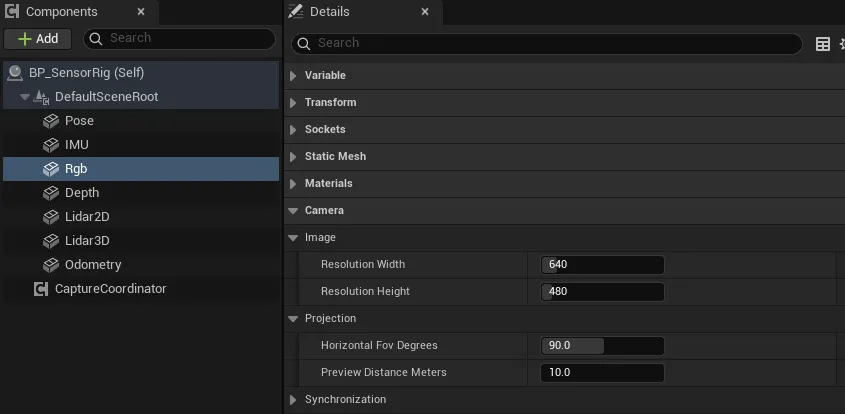
-
连蓝图
在「Events」区点
On Image Frame Ready旁的「+」,照上图连线。 -
运行
Auto Start默认开启,开始运行后相机立即采集一帧,之后按Update Rate Hz(30 Hz)持续采集。
| 属性 | 默认值 | 作用 |
|---|---|---|
Resolution Width |
640 | 图像宽度,单位像素,范围 16 到 4096 |
Resolution Height |
480 | 图像高度,单位像素,范围 16 到 4096 |
Horizontal Fov Degrees |
90 | 水平视场(Field of View,FOV),单位 °,范围 1 到 170。垂直视场由宽高比算出 |
Preview Distance Meters |
10 | 编辑器视口里视锥的长度,单位 m。也是烟雾叠加的最远距离 |
External Render Target |
空 | 使用自己的 Render Target 代替自动创建的。格式必须是 RGBA8,图像尺寸取自它 |
Capture Group Id |
空 | 非空时由相机采集协调器统一触发,相机自己不再采样 |
Update Rate Hz |
30 | 采集频率,单位 Hz |
Sensor Id、Frame Id |
rgb_camera |
帧头里的传感器 ID 和 TF frame id,见帧头与采样状态 |
通用属性(Auto Start、Sensor Enabled 等)见传感器通用用法。
烟雾相关的属性(Enable Smoke Interference、Smoke Interference Tint 等)见感知介质(烟雾干扰)。
On Image Frame Ready:每次产生有效帧后触发,Frame是这一帧。深度相机共用这个事件。Get Latest Image Frame:返回最近一帧,不会触发新的采集;还没有采过样时为空。Sample RGBCamera:手动采集一次,得到有效帧时返回 true。Get Preview Render Target:返回相机渲染到的 Render Target。
Frame 是一个 UBot Image Frame 对象。图像在 GPU 的 Render Target 里,下面的节点负责把它读到 CPU:
| 节点 | 作用 |
|---|---|
Request Pixel Readback |
把这一帧的像素读回 CPU,返回是否成功,失败原因在 Error Message 里 |
Has CPUPixel Data |
像素是否已经在 CPU 上 |
Get BGRAPixel by Coordinates |
取坐标 (X, Y) 处的 Color。坐标越界或没有像素数据时 Return Value 为 false |
Get Pixel Data Size Bytes |
像素缓冲区的字节数 |
Copy Pixel Bytes (High Cost) |
全部像素字节的副本 |
Clear CPUPixel Data |
释放 CPU 上的像素数据 |
- 编码(
Encoding)是BGRA8:每个像素 4 个字节,顺序为 B、G、R、A,Row Stride Bytes等于Width× 4。 - 像素坐标的原点在左上角,X 向右,Y 向下。
- 帧上还有
Width、Height(单位像素)、Horizontal Fov Radians、Vertical Fov Radians(单位 rad)、Sensor Transform World(采集时传感器在 UE 世界里的变换,单位 cm)和Header。 Capture Group Id、Capture Sequence、Capture Timestamp Seconds和Synchronized只在相机属于采集组时有意义,见相机采集协调器。
帧上的 Fx、Fy、Cx、Cy 是针孔模型的内参(Intrinsics),单位像素,由分辨率和水平视场算出。
| 量 | 计算 | 默认值(640 × 480,90°) |
|---|---|---|
Fx |
Width / (2 * tan(Horizontal Fov / 2)) |
320 |
Fy |
与 Fx 相同(方形像素) |
320 |
Cx |
(Width - 1) / 2 |
319.5 |
Cy |
(Height - 1) / 2 |
239.5 |
-
编辑器视口里选中组件,会画出一个长度为
Preview Distance Meters的视锥,用来检查视野。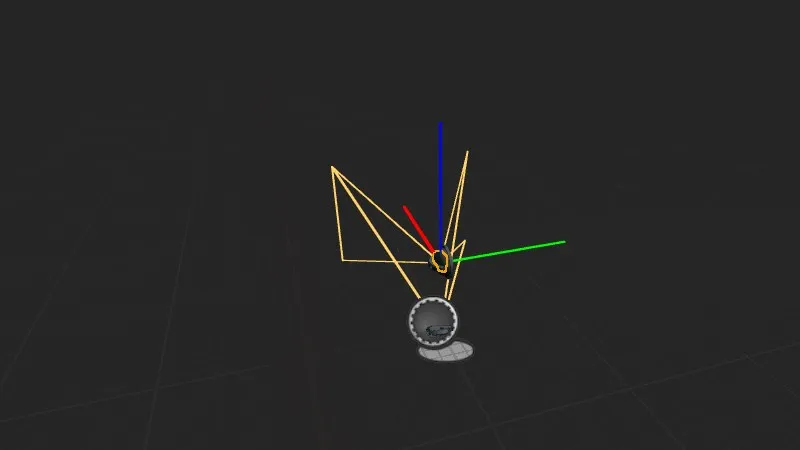
图中只是示意:画面里的视锥长度和视场与默认值不同,数值以设置表为准。
-
Get Preview Render Target返回的是一个普通的 Render Target,可以拿去给材质或 UI 显示相机画面。
Request Pixel Readback是同步的,会等渲染完成,开销高。只在需要像素的时候调用,不需要每帧都读。- 只有最新一次采集的帧能读回。相机再次采集后,旧帧的读回会失败,
Error Message说明帧已过期;已经读回的数据不受影响。所以在On Image Frame Ready里读回最稳妥。 - 读回后的像素缓冲区很大:640 × 480 时约 1.2 MB。用完后调用
Clear CPUPixel Data释放。 Copy Pixel Bytes (High Cost)每次调用都复制整个缓冲区。只读几个像素时用Get BGRAPixel by Coordinates。- 烟雾叠加发生在读回时,只改 CPU 上的像素,Render Target 本身不受影响,所以预览画面里看不到烟雾。
External Render Target的格式不是 RGBA8 时,这次采样的状态是Error,触发On Sensor Error,不产生帧。
- uBot RGB Camera Sensor:这个组件自己的属性。
- UBot Camera Sensor Component:RGB 和深度相机共有的属性和节点。
- UBot Image Frame:帧上的节点和属性。
- 深度相机:深度编码和深度读取。
- 相机采集协调器:让多个相机同一时刻采集。
- 性能与采样频率:读回的开销和建议频率。