

3D 激光雷达
需要:uBotSensor 0.1.x(含依赖 uBotCore)
用 uBot 3D LiDAR Sensor 在水平和垂直方向上扫描,并在蓝图里从点云(point cloud)帧中读出点和强度。
连线:
- On 3DLidar Frame Ready (Lidar3D) 的 执行,连到 Branch 的 执行
- On 3DLidar Frame Ready (Lidar3D) 的 Frame,连到 Get Point by Index 的 Target
- Get Point by Index 的 Return Value,连到 Branch 的 Condition
- Get Point by Index 的 Point Meters,连到 Vector Length 的 A
- Vector Length 的 Return Value,连到 To String (Float) 的 In Double
- Branch 的 True,连到 Print String 的 执行
- To String (Float) 的 Return Value,连到 Print String 的 In String
Point Meters在传感器坐标系下,单位 m。Return Value为 false 说明索引越界,例如这一帧没有任何命中点。- 点到原点的长度就是这个点的距离。
On 3DLidar Frame Ready (Lidar3D)
uBot 3D LiDAR Sensor · UBotSensor
每次产生有效帧后触发,Frame 是这一帧点云。
输出
- 执行
- Frame
UBot Point Cloud Frame对象引用
查看参考UUBot3DLidarSensorComponent.On3DLidarFrameReady
Get Point by Index
Target is UBot Point Cloud Frame · UBotSensor
按索引读取一个点:传感器坐标系下的位置(单位 m)、环号、时间偏移(单位 s)和强度。索引越界时返回 false。
输入
- Target
UBot Point Cloud Frame对象引用 - Index
Integer
输出
- Point Meters
Vector - Ring Index
Integer - Time Offset Seconds
Float - Intensity
Float - Has Intensity
Boolean - Return Value
Boolean
查看参考UUBotPointCloudFrame.GetPointByIndex
Branch
UE 引擎 · 中文界面:分支
Branch Statement If Condition is true, execution goes to True, otherwise it goes to False
输入
- 执行
- Condition
Boolean
输出
- True
- False
查看参考K2Node_IfThenElse
Vector Length
UE 引擎 · 中文界面:向量长度
Returns the length of the vector
输入
- A
Vector
输出
- Return Value
Float (double)
查看参考UKismetMathLibrary.VSize
To String (Float)
UE 引擎 · 中文界面:转换为字符串(浮点)
Converts a double value to a string
输入
- In Double
Float (double)
输出
- Return Value
String
查看参考UKismetStringLibrary.Conv_DoubleToString
Print String
UE 引擎 · 中文界面:打印字符串
Prints a string to the log, and optionally, to the screen If Print To Log is true, it will be visible in the Output Log window. Otherwise it will be logged only as 'Verbose', so it generally won't show up.
输入
- 执行
- In String
String - Print to Screen
Boolean - Print to Log
Boolean - Text Color
Linear Color结构体 - Duration
Float - Key
Name
输出
- 执行
查看参考UKismetSystemLibrary.PrintString
-
添加组件
在「Components」面板点「Add」,搜索
uBot 3D LiDAR Sensor,重命名为Lidar3D,并附着到机器人上。 -
设置视场与线数
选中组件,在「Details」面板的「3D Li DAR > Scan」里设置视场(Field of View,FOV)、通道(channel)数和每个通道的射线数。默认是水平 360°、垂直上下各 15°、16 个通道、每个通道 360 条射线。
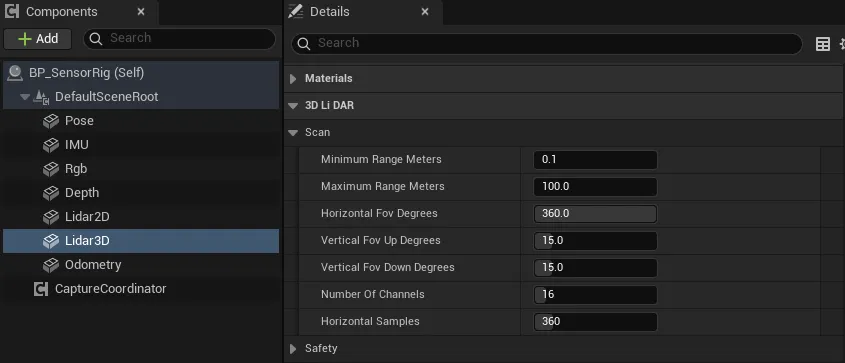
编辑器把类别名里的
LiDAR拆成Li DAR,按截图里显示的找。 -
连蓝图
在「Events」区点
On 3DLidar Frame Ready旁的「+」,照上图连线。 -
运行
Auto Start默认开启,开始运行后传感器立即扫描一次,之后按Update Rate Hz(10 Hz)持续扫描。
| 属性 | 默认值 | 作用 |
|---|---|---|
Horizontal Fov Degrees |
360 | 水平视场,单位 °,范围 0.01 到 360。以传感器的 X 轴为中心,左右各占一半 |
Vertical Fov Up Degrees |
15 | 向上的视场,单位 °,范围 0 到 90 |
Vertical Fov Down Degrees |
15 | 向下的视场,单位 °,范围 0 到 90 |
Number Of Channels |
16 | 垂直方向的线数(通道),范围 1 到 256。从向下到向上均匀分布,只有 1 个通道时水平射出 |
Horizontal Samples |
360 | 每个通道的射线数,范围 1 到 8192。水平视场是 360° 时首尾不重复,其他视场首尾都取到 |
Maximum Rays Per Scan |
65536 | 单次扫描的射线数上限,见下方注意事项 |
Minimum Range Meters |
0.1 | 最小量程,单位 m |
Maximum Range Meters |
100 | 最大量程,单位 m,必须大于最小量程 |
Range Noise Std Dev Meters |
0 | 距离噪声的标准差,单位 m。同时需要开启 Noise Enabled,只作用于命中的射线 |
Update Rate Hz |
10 | 扫描频率,单位 Hz |
Sensor Id、Frame Id |
lidar_3d |
帧头里的传感器 ID 和 TF frame id,见帧头与采样状态 |
射线检测设置
Section titled “射线检测设置”每束射线做一次按通道的单线检测(Line Trace by Channel)。
| 属性 | 默认值 | 作用 |
|---|---|---|
Trace Channel |
Visibility | 检测用的碰撞通道,只有对该通道设为阻挡(Block)的物体会被扫到 |
Trace Complex |
false | 为 true 时对复杂碰撞(逐三角面)检测,开销更高 |
Ignore Owner |
true | 忽略传感器所属的 Actor,避免扫到机器人自己 |
Ignored Actors |
空 | 额外忽略的 Actor 列表 |
Debug Visualization |
false | 运行时抽样画出一部分射线,命中为绿色,未命中为红色 |
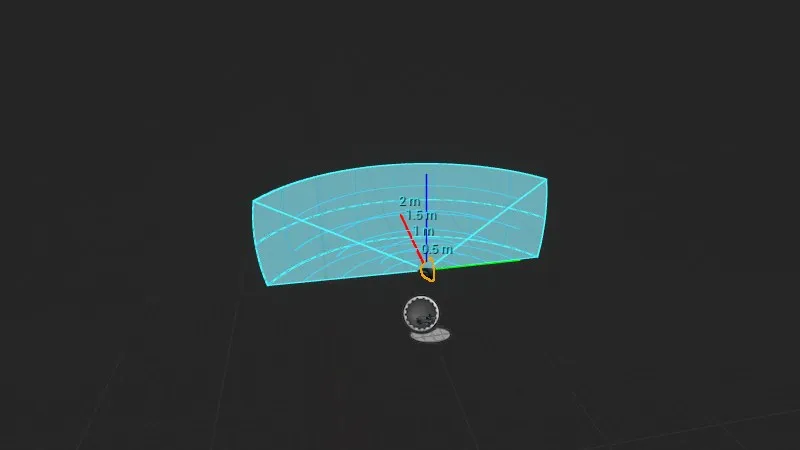
在编辑器视口里选中组件,会画出视场的外壳:填色的量程范围、按距离画的圆弧、按角度画的经纬线,以及距离标注。图中是示意:为了让外壳完整可见,量程和视场调小了,数值以设置表为准。
下面的属性在「Details」面板的「3D Li DAR > Editor Preview」里,只用于编辑器,不影响采样:
| 属性 | 默认值 | 作用 |
|---|---|---|
Range Preview Color |
浅蓝 (0.05, 0.65, 1.0) | 外壳、网格和标注的颜色 |
Range Preview Opacity |
0.12 | 外壳填色的不透明度,范围 0 到 1;0 表示不填色 |
Distance Grid Interval Meters |
5 | 距离圆弧的间隔,单位 m,最小 0.1。圆弧最多 8 条,量程很大时间隔会自动加倍 |
Angular Grid Interval Degrees |
15 | 角度网格线的间隔,单位 °,范围 1 到 90 |
Show Range Labels |
true | 在圆弧上标出距离,格式如 5 m |
通用属性(Auto Start、Noise Enabled 等)见传感器通用用法。
On 3DLidar Frame Ready:每次产生有效帧后触发,Frame是这一帧。Get Latest 3DLidar Frame:返回最近一帧,不会触发新的扫描;还没有采过样时为空。Sample 3DLidar:手动扫描一次,得到有效帧时返回 true。- 通用事件
On Sensor Sampled、On Sensor Error见传感器通用用法。
Frame 是一个 UBot Point Cloud Frame 对象,只包含有效命中的点。
| 节点 | 返回 |
|---|---|
Get Point Count |
命中点数 |
Get Total Ray Count |
这次扫描发射的射线总数 |
Get Point by Index |
Point Meters、Ring Index、Time Offset Seconds、Intensity、Has Intensity,以及索引是否有效的 Return Value |
Get Intensities |
每个点一个强度,与点一一对应 |
Has Intensity Data |
这一帧有没有强度数据 |
Copy All Points (High Cost) |
全部点的副本 |
Copy All Ring Indices (High Cost) |
全部环号的副本 |
Copy All Time Offsets (High Cost) |
全部时间偏移的副本 |
Copy All Intensities (High Cost) |
全部强度的副本 |
Point Meters:传感器坐标系下的点,单位 m,坐标轴保持 UE 约定(X 前、Y 右、Z 上)。Ring Index:点所在的通道序号(环号),0 是最下面的一条线。Time Offset Seconds:目前恒为 0,一次扫描在同一仿真时刻完成。
帧上的属性有 Total Ray Count、Hit Point Count、Channel Count、Horizontal Sample Count、Horizontal Fov Radians、Vertical Fov Up Radians、Vertical Fov Down Radians、Minimum Range Meters、Maximum Range Meters、Scan Period Seconds 和 Header。Capture Duration Milliseconds 是生成这一帧用的时间,单位 ms。Sensor Transform World 是扫描时传感器在 UE 世界里的变换,单位 cm。
强度(Intensity)范围是 0 到 255,计算式为 255 * Clamp(Dot(-RayDirectionWorld, ImpactNormal), 0, 1):射线垂直打在表面上最强,擦着表面时接近 0。被烟雾截断的点强度为 0。
- 没有命中的射线,以及距离小于
Minimum Range Meters的命中,都不产生点。所以点的索引不对应固定的射线方向。Ring Index只表示垂直方向的通道;要按水平方向处理,用Point Meters的 X、Y 算atan2(Y, X),向右为正。 Number Of Channels乘以Horizontal Samples超过Maximum Rays Per Scan时,这次采样的状态是Error,触发On Sensor Error,不产生帧,也不会截断射线数。- 最大量程不大于最小量程时,这次采样同样是
Error状态。 Copy All ...(High Cost)每次调用都复制整个数组。逐点处理用Get Point by Index,需要全部数据时调用一次并存进变量。- 默认每次扫描发射 16 × 360 = 5760 条射线,10 Hz 时每秒 57600 次射线检测。
Capture Duration Milliseconds可以用来估算每帧耗时,各传感器的开销对比见性能与采样频率。 - 烟雾等感知介质会截断射线,见感知介质(烟雾干扰)。
- uBot 3D LiDAR Sensor:全部属性。
- UBot Point Cloud Frame:帧上的节点和属性。
- 传感器通用用法:启动、停止、手动采样和通用事件。
- 帧头与采样状态:
Header里的Valid和状态码。 - 坐标系与单位:UE 坐标系和 uBot 的单位约定。