

Identity 组件
需要:uBotCore 0.1.x
给机器人 Actor 加上 uBot Identity 组件,统一它的机器人 ID(Robot Id)、命名空间(Namespace)和基座坐标系(Base Frame Id),并在蓝图里读取最终生效的值。
uBotROS 从这个组件读取机器人的名字,所以名字只需要在一处设置。
Get Resolved Namespace 返回回退之后的结果:Namespace 留空时,用机器人 ID 净化后的名字。
连线:
- Event BeginPlay 的 执行,连到 Print String 的 执行
- Identity 的 Identity,连到 Get Resolved Namespace 的 Target
- Get Resolved Namespace 的 Return Value,连到 Print String 的 In String
- 从「Components」面板把 Identity 组件拖进事件图。
Event BeginPlay
UE 引擎 · 中文界面:事件开始运行
Event when play begins for this actor.
输出
- 执行
查看参考AActor.ReceiveBeginPlay
Identity
组件或变量引用。在 Components 面板里把 Identity 拖进事件图即可得到它。
输出
- Identity
uBot Identity对象引用
Get Resolved Namespace
Target is uBot Identity · UBotCore
返回 Namespace;留空时返回净化后的机器人 ID。
输入
- Target
uBot Identity对象引用
输出
- Return Value
String
查看参考UUBotIdentityComponent.GetResolvedNamespace
Print String
UE 引擎 · 中文界面:打印字符串
Prints a string to the log, and optionally, to the screen If Print To Log is true, it will be visible in the Output Log window. Otherwise it will be logged only as 'Verbose', so it generally won't show up.
输入
- 执行
- In String
String - Print to Screen
Boolean - Print to Log
Boolean - Text Color
Linear Color结构体 - Duration
Float - Key
Name
输出
- 执行
查看参考UKismetSystemLibrary.PrintString
-
添加组件
打开机器人的 Actor 蓝图,在「Components」面板点「Add」,搜索
uBot Identity(在「uBot」分类下)。 -
填写字段
在「Details」面板里按需要填
Robot Id、Namespace等。全部字段都可以留空,留空时按下表回退。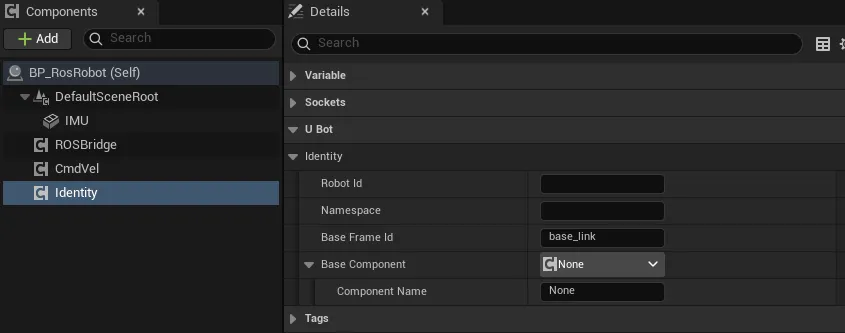
-
读取结果
需要名字时,从组件上拖出
Get Resolved Robot Id、Get Resolved Namespace或Get Base Frame Id。直接读Robot Id等属性拿到的是没有回退的原始值,可能是空的。
| 属性 | 默认值 | 留空或无效时 |
|---|---|---|
Robot Id |
空 | 用所属 Actor 的名字;首尾的空白会被去掉 |
Namespace |
空 | 用净化后的机器人 ID,规则同 Sanitize ROS Name;填写的值只去掉首尾的空白和 /,不会净化 |
Base Frame Id |
base_link |
用 base_link |
Base Component |
空 | 用所属 Actor 的根组件 |
Actor 的名字是 AActor::GetName() 的结果,不是「Outliner」里显示的标签,所以打包后结果不变。Base Component 指向的必须是场景组件(Scene Component),否则同样回退到根组件。
组件没有事件,下面四个节点都是纯函数:
| 节点 | 输出 |
|---|---|
Get Resolved Robot Id |
String,Robot Id 或所属 Actor 的名字;没有所属 Actor 时为空 |
Get Resolved Namespace |
String,Namespace 或净化后的机器人 ID |
Get Base Frame Id |
String,Base Frame Id 或 base_link |
Get Base Component |
Scene Component,指定的组件或根组件,也可能为空 |
| 使用方 | 读取什么 | 页面 |
|---|---|---|
uBot ROS Sensor Bridge |
Namespace(话题前缀)、Base Frame Id、Base Component |
发布传感器数据 |
uBot ROS Velocity Command |
Namespace(话题 /<namespace>/cmd_vel) |
接收 cmd_vel |
这两个组件上各有 Robot Namespace Override,Sensor Bridge 上还有 Base Frame Override。填了覆盖项就以覆盖项为准。
- 组件是可选的。Actor 没有它时,使用方按同样的规则回退:Actor 名、净化后的 Actor 名、
base_link和根组件。 - 每个机器人加一个组件就够了。
- 在「Outliner」里改 Actor 的标签不会改变机器人的名字;要改名,填
Robot Id。
- uBot Identity:全部节点和属性。
- 标识与命名:Sensor Id、Frame Id 和命名建议。
- UE/ROS 约定库:
Sanitize ROS Name的规则。