

风
需要:uBotAerial 0.1.x(含依赖 uBotCore),并启用引擎插件 EnhancedInput
在关卡里放一个 uBot Wind 加上恒定风和阵风,并用蓝图在运行时改变它。
下面把关卡里的风改成 3 m/s 的侧风并打开:
连线:
- Event BeginPlay 的 执行,连到 Get Actor Of Class 的 执行
- Get Actor Of Class 的 执行,连到 Set Wind Settings 的 执行
- Get Actor Of Class 的 Return Value,连到 Set Wind Settings 的 Target
- Get Actor Of Class 的 Return Value,连到 Set Wind Enabled 的 Target
- Make Vector 的 Return Value,连到 Make UBot Wind Settings 的 Constant Velocity Meters Per Second
- Make UBot Wind Settings 的 UBot Wind Settings,连到 Set Wind Settings 的 New Settings
- Set Wind Settings 的 执行,连到 Set Wind Enabled 的 执行
- Y 为 3:世界系的风速,即空气移动的方向,单位 m/s。
Event BeginPlay
UE 引擎 · 中文界面:事件开始运行
Event when play begins for this actor.
输出
- 执行
查看参考AActor.ReceiveBeginPlay
Get Actor Of Class
UE 引擎 · 中文界面:获取类的actor
Find the first Actor in the world of the specified class.
输入
- 执行
- Actor Class
Actor类引用
输出
- 执行
- Return Value
Actor对象引用
查看参考UGameplayStatics.GetActorOfClass
Make Vector
UE 引擎 · 中文界面:创建向量
Makes a vector {X, Y, Z}
输入
- X
Float (double) - Y
Float (double) - Z
Float (double)
输出
- Return Value
Vector
查看参考UKismetMathLibrary.MakeVector
Make UBot Wind Settings
UBotAerial
用各字段组装一个 UBot Wind Settings。
输入
- Constant Velocity Meters Per Second
Vector - Gust Standard Deviation Meters Per Second
Vector - Gust Correlation Time Seconds
Float - Seed
Integer
输出
- UBot Wind Settings
UBot Wind Settings结构体
查看参考Make:FUBotWindSettings
Set Wind Settings
Target is uBot Wind · UBotAerial
从现在起改用新的风设置。
输入
- 执行
- Target
uBot Wind对象引用 - New Settings
UBot Wind Settings结构体
输出
- 执行
查看参考AUBotWind.SetWindSettings
Set Wind Enabled
Target is uBot Wind · UBotAerial
打开或关闭这个风。
输入
- 执行
- Target
uBot Wind对象引用 - New Enabled
Boolean
输出
- 执行
查看参考AUBotWind.SetWindEnabled
-
放风源
把
uBot Wind拖进关卡。风在整个关卡里均匀地吹,与位置无关;多个 Actor 的风叠加。编辑器里的箭头显示恒定风的方向,游戏中隐藏。 -
设置风
在「Details」面板填
Settings:恒定风速、阵风的标准差、相关时间和种子。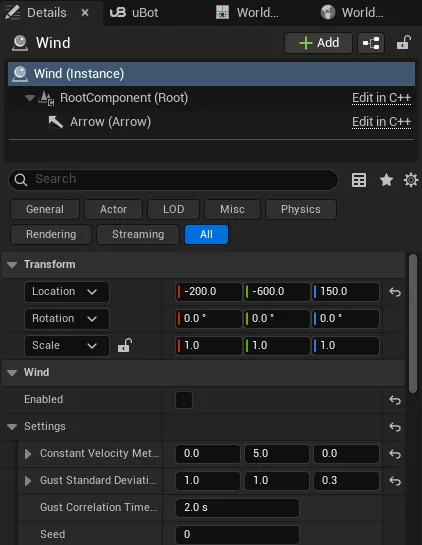
-
控制是否生效
Enabled决定这个 Actor 的风是否吹。运行时用Set Wind Settings和Set Wind Enabled改变。 -
让某架无人机不受风
在这架无人机的
Movement组件上关闭Enable Wind。
试飞关卡里有一个默认关闭的风源:恒定 (0, 5, 0) m/s,阵风标准差 (1, 1, 0.3) m/s。
| 属性 | 默认值 | 作用 |
|---|---|---|
Enabled |
开 | 这个 Actor 的风是否吹 |
Settings 下的 Constant Velocity Meters Per Second |
(0, 0, 0) | 恒定风速,世界系,单位 m/s |
Settings 下的 Gust Standard Deviation Meters Per Second |
(0, 0, 0) | 每个世界轴阵风的标准差,单位 m/s;0 关闭阵风 |
Settings 下的 Gust Correlation Time Seconds |
2 s | 阵风的典型持续时间,越长越平缓,不小于 0.05 s |
Settings 下的 Seed |
0 | 阵风的种子 |
风来自两处,全部叠加:关卡里的 uBot Wind Actor,和用风子系统 uBot Wind Subsystem 的 Set Scripted Wind 设置的风。
Set Scripted Wind(Settings, Enabled):设置一份与关卡里的uBot Wind叠加的风,Enabled为 false 时清除。Get Wind Velocity At(Location Cm):当前仿真时间、该位置的风速,单位 m/s。
这两个节点在 uBot Wind Subsystem 上,要先用引擎的 Get World Subsystem 取得它,风子系统只在 Game 和 PIE 世界里存在。
阵风是每个世界轴 8 个正弦分量的和,由种子预先生成,并按标准差和相关时间缩放。结果只取决于设置和仿真时间:多架无人机查到的风一样,同样的设置在同样的时刻给出同样的风。
- 导航无人机把风当作有界的扰动:恒定风被补偿,不产生位移;风速变化时先随风漂移,再按
Wind Rejection Time Constant Seconds(默认 1 s)补偿,漂移速度是风速变化的Wind Response(默认 0.5)倍。 - 物理和裸机无人机按相对空气的速度计算阻力,机体向来风方向倾斜。
- 内置飞控的位置保持只在两种情况下把无人机拉回:没有指令,或者
Stop Motion(以及Hover的指令丢失动作)之后。 - 发零速度的速度指令不锁定位置,风吹出的位移不会被拉回。例如
Velocity模式下松开摇杆,或者 ROS 的cmd_vel为 0。 uBot Wind在BeginPlay时向风子系统登记。
- uBot Wind 和 uBot Wind Subsystem:全部节点和属性。
- 用速度指令飞导航无人机 和 物理无人机的指令与控制模式:两类无人机对风的响应。